WhatsApp can only transcribe voice notes in one language at a time. You pick a single transcript language in Settings → Chats, and it applies to every chat. So if your mum sends voice notes in Italian, your colleague in English, and your friend switches between Spanish and English mid-sentence, at least two of them won’t transcribe properly. To read multilingual voice notes, use a transcription app with automatic language detection, such as Hearless, which handles notes that switch languages.
How WhatsApp’s language setting actually works
WhatsApp’s Help Center (Android, iPhone) describes it like this:
- You choose one language: “the language most of the voice messages you receive are in”.
- You can change it any time under Settings → Chats → Transcript language.
- Turning transcripts off resets your language choice.
There’s no per-chat setting and no automatic detection. Every voice note gets transcribed as if it were in your chosen language.
Who this trips up
This isn’t a niche problem. When someone on Reddit shared the tip to turn on WhatsApp transcripts, the replies were full of it:
- “It doesn’t apply to bilingual+ households where people swap between the two willy nilly.”
- “It doesn’t even work if your chat with person A is in 1 language and your chat with person B is in another.”
- “You should probably be able to select this for each individual chat instead of as a system wide setting.”
Another user, who speaks Italian, Spanish and English every day, wrote that the feature “does not work for me” for exactly this reason.
You’re likely affected if you:
- live abroad and get voice notes from family in your first language,
- work in an international team, or with clients in other countries,
- are in a bilingual family where people switch languages naturally,
- have friends who mix English into another language (or the other way round).
The language list makes it worse
Even with one language, you’re limited to what WhatsApp supports on your phone:
- Android: English, Portuguese, Spanish and Russian (WhatsApp Help Center, checked 2026-10-23). WhatsApp is testing more, including German, French, Italian and Japanese, in an Android beta (WABetaInfo, 17 Sept 2026), but they’re not on WhatsApp’s official list yet.
- iPhone: 12 languages on iOS 16, 20 on iOS 17 or newer.
The full, dated tables are in which languages WhatsApp transcription supports.
Workarounds inside WhatsApp
If you want to stay with the built-in feature:
- Pick the language you get most notes in. Accept that the others won’t transcribe.
- Switch the setting when you need to. Settings → Chats → Transcript language, every time you want to read a note in another language. It works, but it’s tedious, and on Android a new language may need to download first.
- Speed up the rest. WhatsApp lets you play voice notes at 1.5x or 2x: tap 1x while it plays (WhatsApp Help Center).
What works better: automatic language detection
A transcription app that detects the language per note removes the problem. With Hearless:
- Set the language to Auto Detect and share any voice note. You don’t choose a language up front.
- Notes that switch languages mid-sentence are handled.
- If Auto Detect gets a note wrong, pick the language for that note and transcribe it again. It doesn’t change anything for your other chats.
- 60 languages, on Android and iPhone.
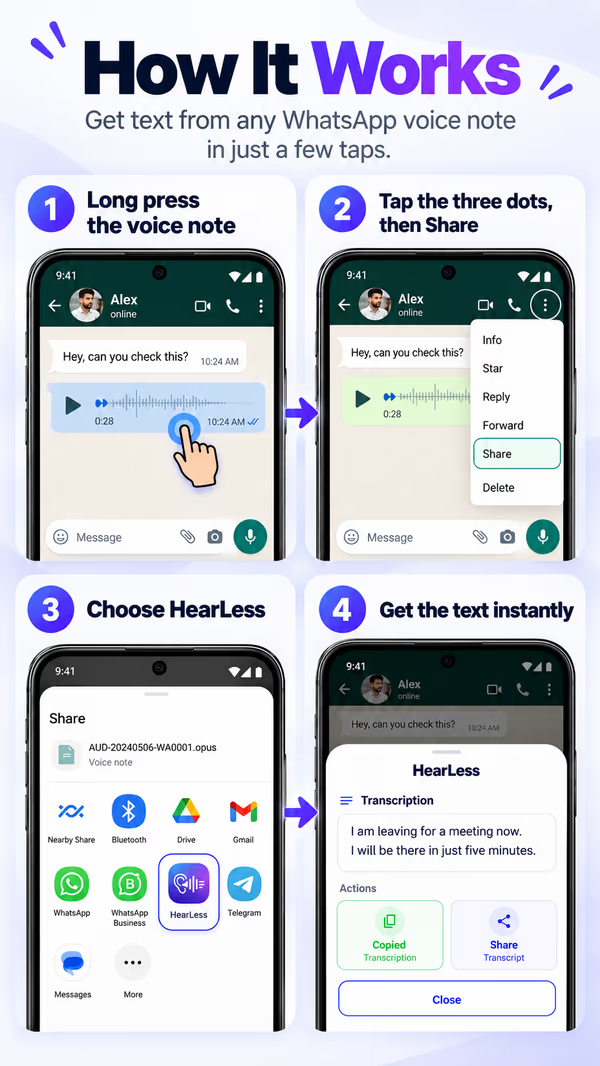
To share a note: in WhatsApp, long-press it, then tap ⋮ → Share on Android, or Forward → Share on iPhone, and pick Hearless.
Hearless also gives you things WhatsApp’s transcripts don’t: you can copy the text, search old transcripts in your library, and read Urdu, Hindi, Punjabi, Arabic, Bengali or Nepali in Latin letters.
The honest trade-off
WhatsApp’s transcripts are free and generated on your phone. Hearless runs in the cloud: voice notes are processed by OpenAI via our servers, and we don’t store them. It needs an internet connection and a sign-in, and after 2 free minutes it uses one-time minute packs, with no subscription.
If all your voice notes are in one supported language, WhatsApp’s own feature is enough. If your chats are multilingual, automatic detection saves you from flipping settings all day. There’s a sourced side-by-side in WhatsApp vs Hearless.
Sources: WhatsApp Help Center, “How to turn voice message transcripts on or off” (Android, iPhone) and “How to play voice messages” (Android), checked 2026-10-23; WABetaInfo, 17 Sept 2026; Reddit threads linked above.