You’re on Android, you got a German voice note, and WhatsApp won’t transcribe it. You long-press, you look for Transcribe, and it’s not there. Meanwhile your friend on an iPhone transcribes German just fine.
You’re not missing a setting. WhatsApp’s built-in transcription doesn’t support German on Android — full stop.
Why this happens
WhatsApp’s voice transcripts run on your device, and the supported languages differ by platform. On iPhone (iOS 16 or newer), German is supported (WhatsApp Help Center). On Android, WhatsApp lists just four languages — English, Portuguese, Spanish and Russian (WhatsApp Help Center) — and German isn’t one of them.
That’s starting to change. WhatsApp is testing German (along with French, Italian and Japanese) in an Android beta (WABetaInfo, 17 Sept 2026), rolling out gradually. As of 2026-10-23 it isn’t on WhatsApp’s official Android list. If your WhatsApp already offers German, use it: it’s free and on your phone. If it doesn’t yet, or you need to copy the text, read on.
The fix: share the note to a German-capable app
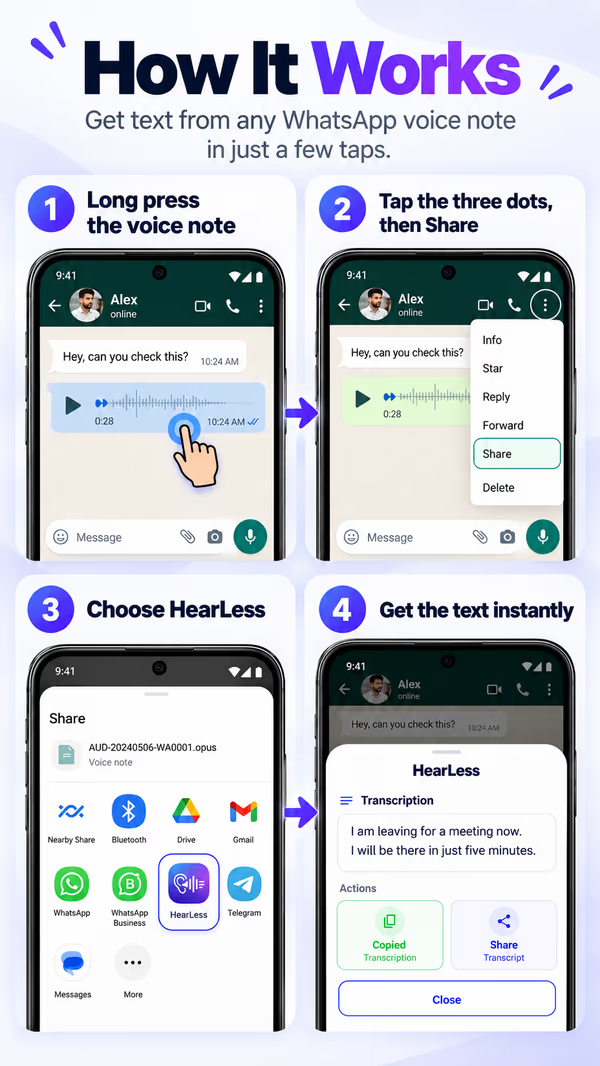
Hearless transcribes German (and 59 other languages) on Android. It works through the same share menu you already use:
- In WhatsApp, long-press the German voice note.
- Tap Share, then choose Hearless.
- Read the clean, punctuated German text in a sheet on top of WhatsApp.
No earphones, no replaying, no switching to an iPhone.
Good to know
- It works for long notes too — there’s no length limit.
- You can transcribe audio files from your phone, not just WhatsApp messages.
- Prefer a side-by-side look at the built-in feature vs a dedicated app? Read the sourced WhatsApp vs Hearless comparison.
Sources: WhatsApp Help Center, “How to turn voice message transcripts on or off” — Android and iPhone, last checked 2026-10-11. Support may change; we re-check quarterly.